ZEISS GPT - Designing an AI chatbot
Client:
Carl Zeiss AG
Industry:
Optics & Medical Technology
ZEISS wanted to bring GPT-powered search to their internal platform. I designed the entire experience — from the first wireframe to the final pixel — over two design iterations and 11 sprint review cycles. The hardest part wasn't designing a chat interface. It was making 40,000 employees trust it.

The problem
ZEISS has been making optics since 1846. They know lenses. But like most large organisations, their internal knowledge was scattered across dozens of platforms, wikis, and shared drives. Employees would spend significant time just finding information — searching through portals, asking colleagues, or giving up entirely.
The idea was to build an AI-powered search tool that could understand natural language questions and pull answers from across the company's knowledge base. Think ChatGPT, but for ZEISS's internal content — product specs, training materials, guidelines, everything.
Simple enough in theory. But designing an AI interface for a 175-year-old optics company is fundamentally different from designing one for a tech startup. The users weren't developers or early adopters. They were engineers, sales reps, and lab technicians who needed the tool to feel trustworthy and familiar from the first interaction.

Checking out the competition
Before sketching anything, I spent time studying how other AI chat products handled the design challenges we were about to face. I looked at ChatGPT, Microsoft Copilot, Google Gemini, and a handful of enterprise AI tools.
I was particularly interested in three things: how they handled the empty state (what does a user see before they've typed anything?), how they formatted AI-generated answers (cards vs. inline text, citations, confidence levels), and how they let users control the AI's behaviour.
Most consumer products hide the complexity. Enterprise products can't afford to — users need to understand what the AI is doing, especially when the answers inform business decisions. This insight shaped most of the design decisions that followed.
I organised my research across 16+ areas in the Figma file: design patterns, answer formatting conventions, strategies for quoting website content, pre-prompt engineering, and suggested queries. This became the reference document the whole team used throughout the project.

Ideation
Armed with research, I started exploring how the interface might work. The core question was: how do you make an AI chat tool feel like a natural part of an existing enterprise platform?
I explored 16+ variations of navigation patterns, conversation flows, and empty states. Some were minimal — just a search bar and nothing else. Others were more structured, with sidebar navigation, model selection, and conversation history.
The tension was always between simplicity (for first-time users) and depth (for power users who want control over the AI's behaviour). I knew we couldn't solve this by picking one extreme — we needed progressive disclosure.

Working out the details
Once the basic concept had buy-in, I moved into detailed wireframes. The product had three main parts: a home screen with search and suggested queries, a conversation view where the AI responds to questions, and a settings layer where users could control the AI's behaviour.
The GPT interface wireframe was the trickiest. AI responses can vary wildly in length, format, and content type. A response might be a single sentence, a bulleted list, a code snippet, or a multi-paragraph explanation with source citations. The layout needed to handle all of these gracefully without breaking.
I also had to figure out how the AI would quote content from ZEISS's internal websites. If someone asks "what's our return policy?" the answer needs to link back to the source document. Getting this citation pattern right was essential for trust — employees needed to verify the AI's answers, not just take them on faith.

Giving users visible control
This was probably the most important design decision in the project.
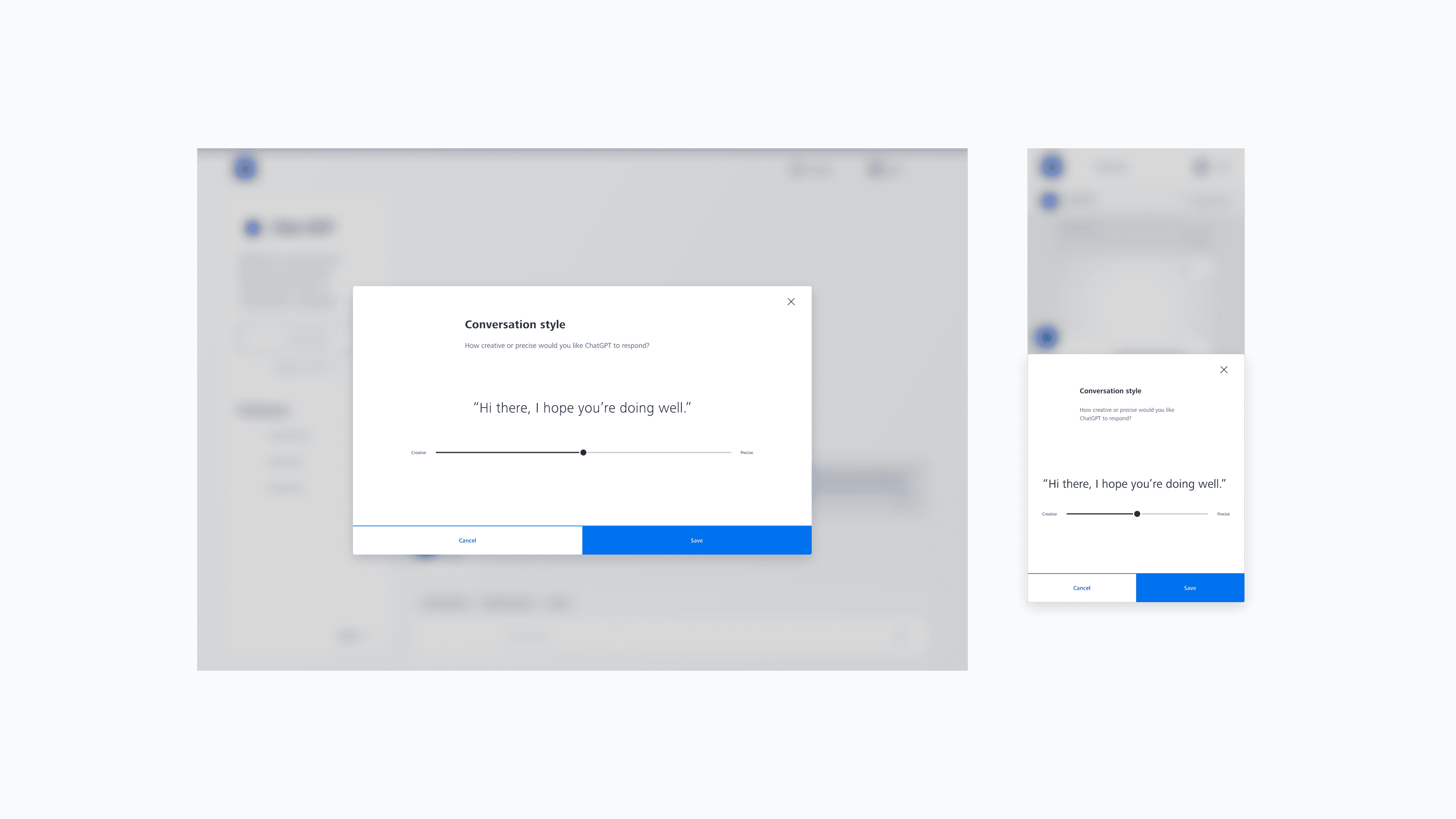
Most AI chat products have a settings page buried somewhere where you can adjust the model's "temperature" — how creative or factual it should be. But nobody finds that. And even if they do, "temperature" means nothing to a sales rep in Munich.
I designed a visible slider that sits right in the conversation: Creative ↔ Precise. Move it toward Creative and the AI gives you more exploratory, expansive answers. Move it toward Precise and it sticks closely to the source material.
This was a small UI element but a massive trust signal. When users can see and adjust how the AI behaves, they feel in control. They're shaping the tool, not being shaped by it. For an enterprise audience that's naturally sceptical of AI, this kind of transparency isn't optional — it's the whole adoption strategy.
Making it feel like ZEISS
One of the biggest risks with internal AI tools is that they feel bolted on — like someone embedded ChatGPT inside a corporate intranet and called it a day. I wanted ZEISS-GPT to feel native to the ZEISS platform from the first click.
Every element — from the chat bubbles to the navigation shell to the model selection modal — uses components from the Beyond Design System that I was simultaneously maintaining. The same buttons, the same inputs, the same typography, the same spacing. This wasn't just an aesthetic choice — it meant users didn't need to learn a new visual language. They just needed to learn the conversation.
I designed 59+ frames to ensure the experience worked across desktop and mobile. On desktop, the sidebar shows conversation history and settings. On mobile, it collapses into a sheet. The conversation style slider moves to a bottom bar. Nothing is lost in translation.
The empty state was a design challenge I spent more time on than I'd expected. When someone opens Zearch for the first time, they see a blank chat. That's intimidating. So I designed an onboarding message — "Hey, I'm Chat" — with three suggested query categories (Ideas, Grammar, Task builder) to give users a starting point. The suggestions are contextual, pulling from trending queries across the organisation.

Sprint reviews
This wasn't a "design it and hand it off" project. I went through 11 sprint review cycles with the development team, refining the interface based on what worked and what didn't as features were implemented.
The first design round established the visual language. The August 2024 update — a significant revision — refined the interaction patterns based on real usage feedback. The empty state onboarding was simplified. The model selection flow was streamlined. The conversation style controls were made more prominent after early users didn't notice them.
The Figma file grew to 19 pages documenting the complete journey: background research, reference screenshots, UX explorations, wireframes, UI benchmarks, 13 key visual variations, two complete design rounds (desktop + mobile each), sprint review screens, and 22+ further ideas for future iterations.
That last part matters. I documented everything I didn't get to ship — context-aware suggestions based on the user's department, conversation branching for complex queries, collaborative features for sharing AI-generated insights with colleagues. These aren't just ideas — they're the roadmap for whoever picks up this work next.

What I learned
Two things from this project that I keep coming back to-
Enterprise AI adoption is a trust problem, not a features problem. You can build the most capable AI chat interface in the world, but if users don't feel in control, they won't use it. The conversation style slider was a tiny piece of the UI but it was the single biggest factor in whether people tried the tool a second time. Visible control builds trust. Hidden complexity breeds suspicion.
Design system integration isn't just aesthetics — it's an adoption strategy. Making ZEISS-GPT look and feel like every other ZEISS tool meant users didn't have to overcome the "this is a new thing" barrier. They'd already learned the visual language. The only new thing was the conversation. That's a much smaller leap than learning a new conversation and a new interface at the same time.
Designing an AI product for an enterprise audience taught me that the hard problems aren't technical — they're human. How do you make someone trust a machine with their work? How do you make a new interaction paradigm feel familiar? How do you design for users who aren't excited about AI, they're wary of it?
Those are the questions I spent most of my time on. And I think the answers live in the small details — a visible slider, a familiar button, a suggested query that actually matches what someone was about to ask.
